Introduction
Assume we have obtained a shell as attacker_svc, a low-privileged domain user. We initially gained access through WinRM using credentials acquired earlier.
Another user (victim) is currently logged on interactively to the same machine. Normally, the obvious approach would be to dump LSASS and extract the user’s credentials. However, because our account lacks the required privileges, that option is off the table.
Our goal is therefore to obtain access to the victim’s account without interacting with their session directly.
This raises an interesting question:
How can we force another logged-on user to authenticate if we cannot access their interactive session?
To answer that, we first need to understand a Windows technology called COM (Component Object Model).
What are COM objects?
COM (Component Object Model) is a Microsoft technology that allows software components to communicate with each other regardless of the programming language they were written in.
A useful analogy is a power outlet.
You can plug in a lamp, a charger, or a computer. Internally, each device is completely different, yet they all expose the same interface the power plug.
COM follows a similar idea. Applications expose well defined interfaces that other applications can use without knowing anything about their internal implementation.
For example, Microsoft Word can automate Microsoft Excel through COM. Word does not need to understand how Excel is implemented internally; it simply calls the interfaces that Excel exposes.
And now the key point: Certain COM classes, when activated through DCOM, cause Windows to establish security using the target user’s context. As part of this activation, Windows performs authentication on behalf of that user. This is what “coerce” means, you’re not asking ‘victim’ to click anything. You’re forcing authentication through the COM mechanism itself.
How can you make it to work?
For this scenario we can use a tool called “KrbRelay” from cube0x0 which creates a local listener, which forces authentication and catches it.
Here’s the command:
KrbRelay.exe -ntlm -session 2 -clsid 354ff91b-5e49-4bdc-a8e6-1cb6c6877182
Let’s break it down:
-
-clsid 354ff91b-...- This is a specific COM object that meets the criteria (RunAs Interactive User, can be activated across sessions). It is your “trigger” that initiates authentication.-
This CLSID is commonly used because it is configured as RunAs: Interactive User and supports cross session activation. Most COM classes do not satisfy both requirements, which is why only a relatively small subset can be abused this way.
-
-
-session 2— you specify in which session the instance should be created. Session 2 = victim logged in interactively. This is the SetSessionId shown below. Without it, the object would be created in your session and the authentication would be yours, which would be useless. -
-ntlm— a mode in which KrbRelay intercepts NetNTLM instead of performing a Kerberos relay. Which gets us a NTLM hash which we can crack using hashcat.
Why does it even work?
When you instruct DCOM to instantiate a COM object within another person’s session, Windows needs to set up the security context to do that. This is authentication, and that authentication is performed as that user and that session, not as you.
You choose the session (via the -session switch), you choose the COM class (via the -clsid switch), and Windows takes care of the rest. Windows does not require any interaction or consent from the target user the authentication is simply a side effect of DCOM activation.
Why is this better than the alternatives?
Tscon session hijacking, token impersonation, and code injection the usual ways to gain access to another person’s session are noisy. In most cases, these require SYSTEM-level or at least administrator level privileges, and they leave many traces on the host machine.
Cross Session Relay does none of that. You’re not grabbing a dump of LSASS, you’re not taking over their desktop, and you’re not injecting into their process. All you are doing is getting Windows to authenticate on their behalf over a normal DCOM call and catching the response.
There’s something worth clearing up. Some people think this is the same as tscon session hijacking, and this is not the case. In tscon, you physically take control of the victim’s desktop, seeing their entire screen, their applications, etc.
In Cross Session Relay you do not at all take over the victim’s session, you just capture a NetNTLMv2 hash that you crack offline.
The methods, their respective use cases, and tradecraft are completely different, which is perfect for lateral movement.
Prerequisites
This attack relies on several requirements being met:
-
You need to be able to execute code on the box you are attacking. In our scenario we use a WinRM shell as attacker_svc, a non-administrator domain user.
-
Somebody else must be logged into the box in an interactive session. This can be either over RDP or from the console. A disconnected session will still work as long as it has not logged off from the box.
-
You must have the other person’s session ID. The command to get this is qwinsta or query user but unfortunately this is not permitted within a WinRM session, since the session is assigned a Network (type 3) logon token and the Query Information permission on the Terminal Services endpoint does not apply to this token type. Fortunately, we can sidestep this issue using RunasCs.exe -l 9, and then use this session ID to perform a DCOM activation (more below).
-
You must have a CLSID which is eligible to perform this action. The COM class needs to have its RunAs configured as “Interactive User” and must not forbid cross-session activation, which most COM classes do. One CLSID that does work and which is commonly used is 354ff91b-5e49-4bdc-a8e6-1cb6c6877182.
-
The victim has to be logged into the same machine you already have a shell on.
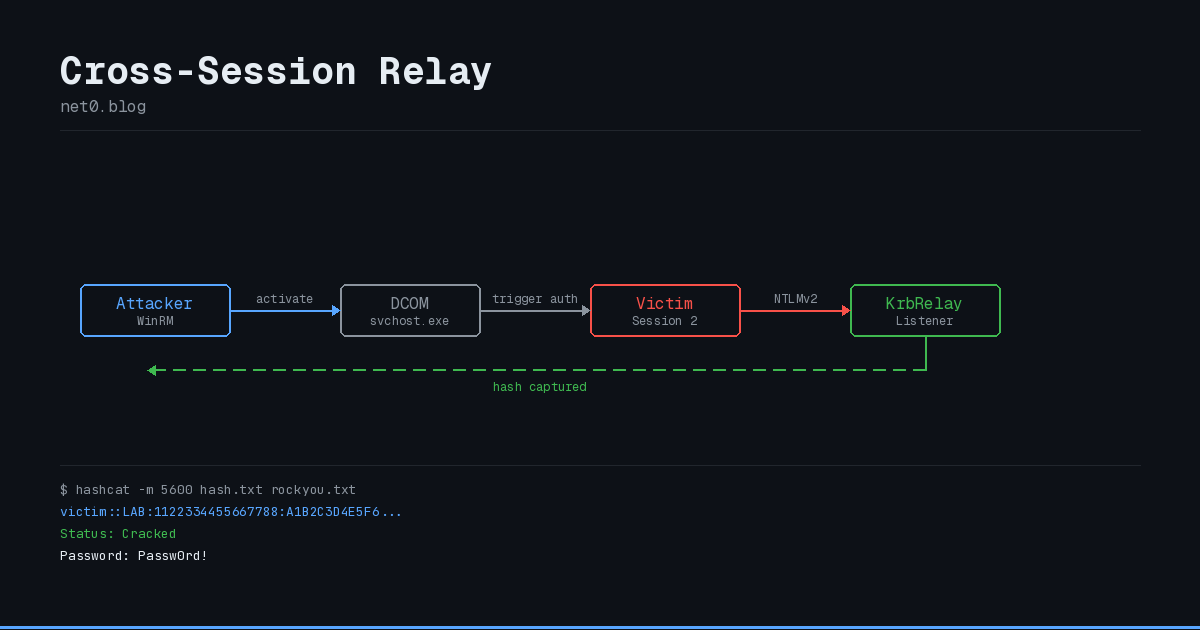
sequenceDiagram

participant A as Attacker (WinRM)

participant D as DCOM Service

participant V as Victim Session

participant K as KrbRelay Listener

A->>D: Activate COM object in Session 2

D->>V: COM activation triggers auth

V->>K: NetNTLMv2 authentication

K-->>A: Hash captured

Note over A: Crack with hashcat
Walkthrough
We begin with a WinRM shell as attacker_svc, a domain user, without administrator privileges.
Step 1 - Enumerate sessions
Normally, the first step you’d take would be to see if anybody else is logged onto the box:

This does not work, since the winrm session results in a network logon (type 3) and the user’s token does not have the permission for the Terminal Services endpoint to retrieve this information. This is why qwinsta fails and returns the following “There are no sessions running.” message.
Step 2 - Bypass with RunasCs
We bypass the lack of permissions with the following RunasCs.exe command:
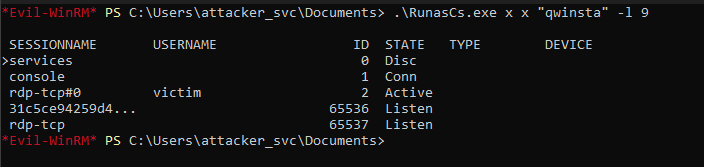
Evidence of another user currently logged in.
This provides us with the following, showing that another user, victim, is logged into the machine in session 2 via RDP. The username and password don’t matter here, type 9 doesn’t validate them. It just creates a new token with the INTERACTIVE group instead of NETWORK, which is enough to run qwinsta, which is sufficient for us to perform the command above.
Step 3 - Launch KrbRelay
Now, we can launch KrbRelay via the RunasCs utility to perform a DCOM activation within the victim’s session:
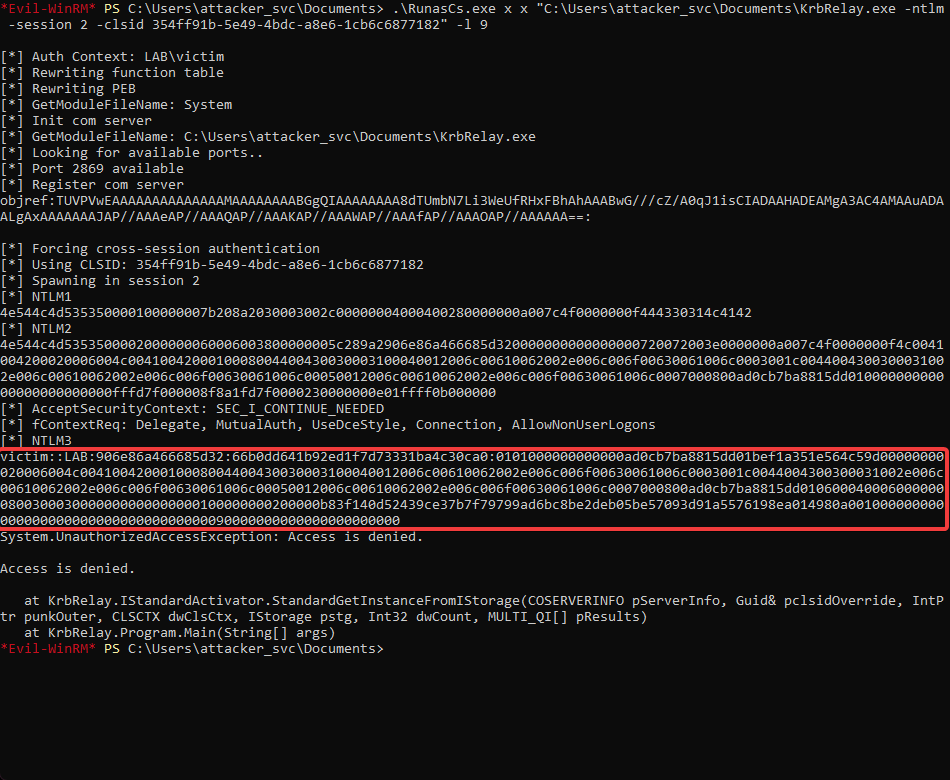
Captured NetNTLMv2 hash.
Here is what happened during the previous command execution. First, KrbRelay was initiated with RunasCs.exe -l 9 and then, we supplied it with the -session parameter (value is 2 from the last step) along with a chosen CLSID. Once initiated, KrbRelay will begin listening on 127.0.0.1 and send a call to CoGetInstanceFromIStorage with SetSessionId(2). When the COM object is successfully instantiated in session 2, a request to authenticate as the user currently logged into session 2 is made, and KrbRelay captures the NetNTLMv2 hash of the victim.
Step 4 - Crack the hash
Finally, take the captured hash offline, and pass it to hashcat to retrieve the victim’s password:

Cracked password.
We have successfully obtained the victim’s password using this technique. There was no LSASS dump, no session hijacking or process injection needed!
Detection
While this attack method is more stealthy than an LSASS dump, it does leave several indicators on the machine that can alert a skilled administrator:
Event ID 4648 (Explicit Credential Logon) - This event is logged whenever an explicit credential logon occurs, and it may appear when the DCOM activation targeting the local listener occurs. The crucial identifier here will be a target server name of localhost on a random, unusual port.
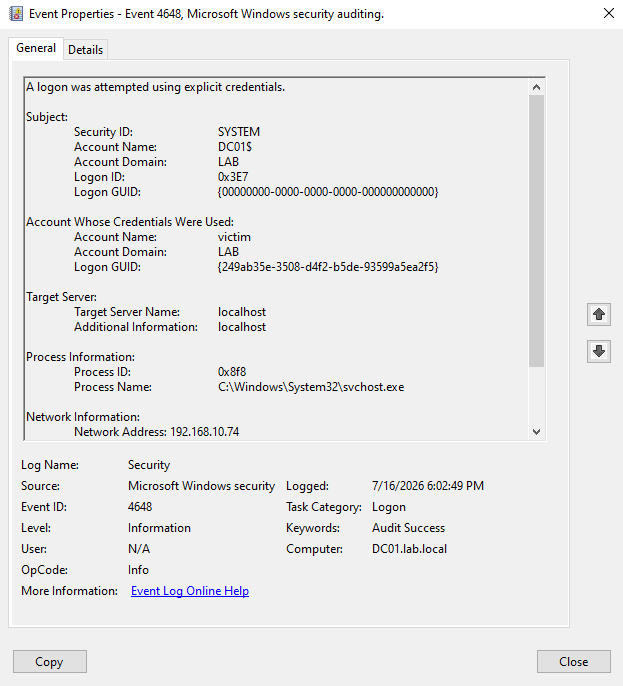
4648 Event.
Event ID 10016 / 10036 / 10028 (DCOM Warning) - This event will be found within the system event log. It states the CLSID that was activated along with the user that initiated the action. Having COM objects activated in another person’s session is unusual.
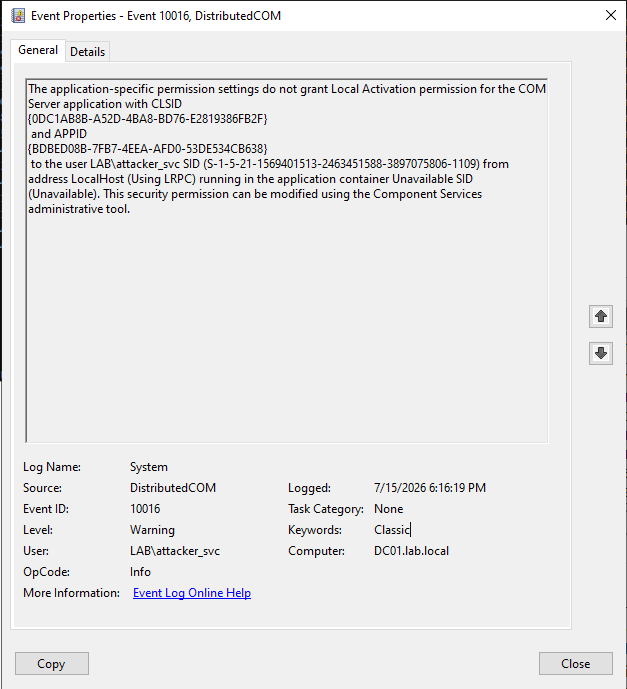
10016 Event.
CLSID monitoring - If you regularly monitor for the instantiation of CLSIDs on your servers, you will want to be looking for instances of 354ff91b-…` being initiated in non-interactive sessions.
Short-lived local listeners - A TCP listener will be spawned on 127.0.0.1 and will remain open just long enough for the NetNTLMv2 hash to be transmitted before being terminated. The presence of processes within a WinRM shell that are also spawning local listeners can be a sign of compromise.
Event ID 4624, Logon Type 9 - Logon type 9 is incredibly rare to see. If an explicit credential logon using this logon type is logged on a server, especially a logon initiated from a WinRM session, something is wrong.
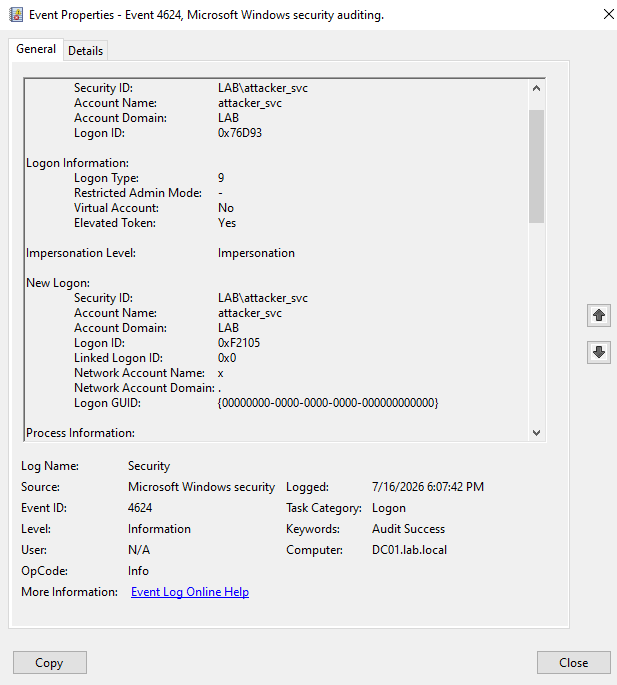
4624 Event.
Conclusion
The security boundaries of Windows sessions are not inherently secure against attacks leveraging code execution on the local machine if another user is logged in. With code execution, you can take advantage of DCOM activation to cause Windows to authenticate as the victim user, no LSASS dumps, token theft, or process injection required. This is only possible because of how COM instantiation is handled when you target another user’s session.
For defense: if you are responsible for securing Windows endpoints, you should be looking for Logon Type 9, as well as unusual DCOM activation events on machines running WinRM, since these events are extremely uncommon during normal operation.
References
- Windows Exploitation Tricks: Relaying DCOM Authentication – James Forshaw, Project Zero
- Using Kerberos for Authentication Relay Attacks – James Forshaw, Project Zero
- Component Object Model – Official documentation